
Free
Best for trying Qarar on a few of your own meetings each month.
US$0a month
- Transcription
- 4 meetings a month
- Longest meeting
- 90 minutes

Transcript in dialect, notes in Modern Standard Arabic.
Free: 4 meetings a month, up to 90 minutes each. No card required. Works in the browser on Windows, a Mac or a phone, with nothing to install. No bot joins your call.
Optional Mac recorder Requires macOS 14.4 or later.
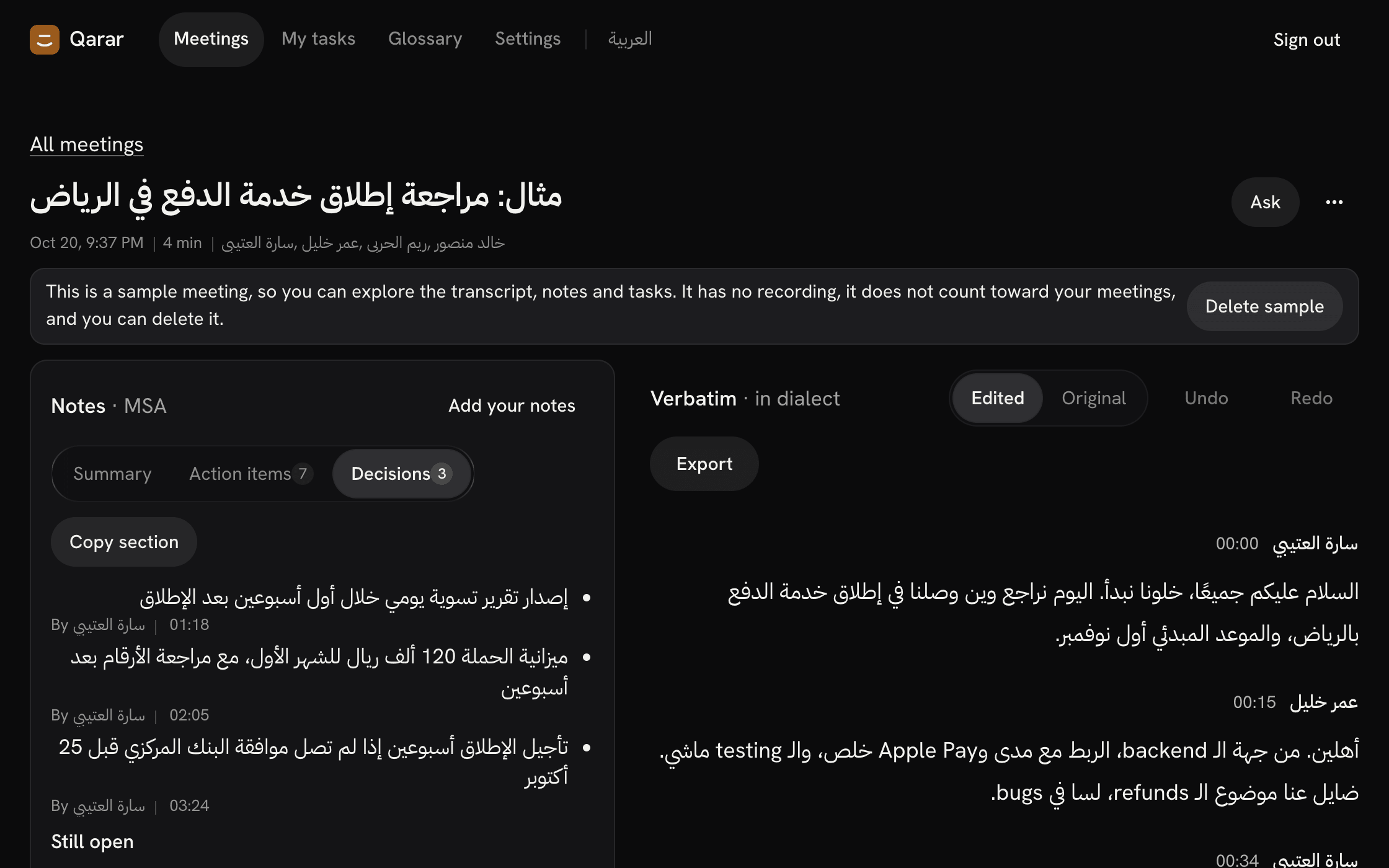
Select a timestamp to read the line it came from, in the dialect it was said.
مراجعة خطة الإطلاق
تُطلق نسخة تجريبية يوم الأحد، وتُراجع نتائجها بعد أسبوع.
إرسال ملخص الاجتماع إلى الجميع
مراجعة نتائج النسخة التجريبية
منى
صباح الخير يا جماعة، خلّينا نبدأ بمراجعة خطة الإطلاق
Speaker 2
تمام، أنا وكريم جهّزنا الأرقام من الأسبوع اللي فات
Glossary fixed “كرين”
منى
ممتاز، قبل الأرقام عايزين نتفق على موعد الـ launch
Speaker 3
أنا شايف إن آخر الشهر أنسب عشان فريق الدعم يكون جاهز
Speaker 2
بس لو أجّلنا هنخسر حملة رمضان، والـ budget اتصرف خلاص
منى
اتفقنا، نطلق التجريبية يوم الأحد ونراجع النتائج بعدها بأسبوع
Speaker 2
وأنا هبعت ملخص الاجتماع للكل النهارده
The words stay in Egyptian Arabic, and the English ones stay in Latin script. The notes are in Modern Standard Arabic, each tied to the line it came from. Nobody named the other two speakers, so Qarar leaves them unnamed.
An illustrative meeting we wrote to show the format. It isn’t a real recording and has no audio.
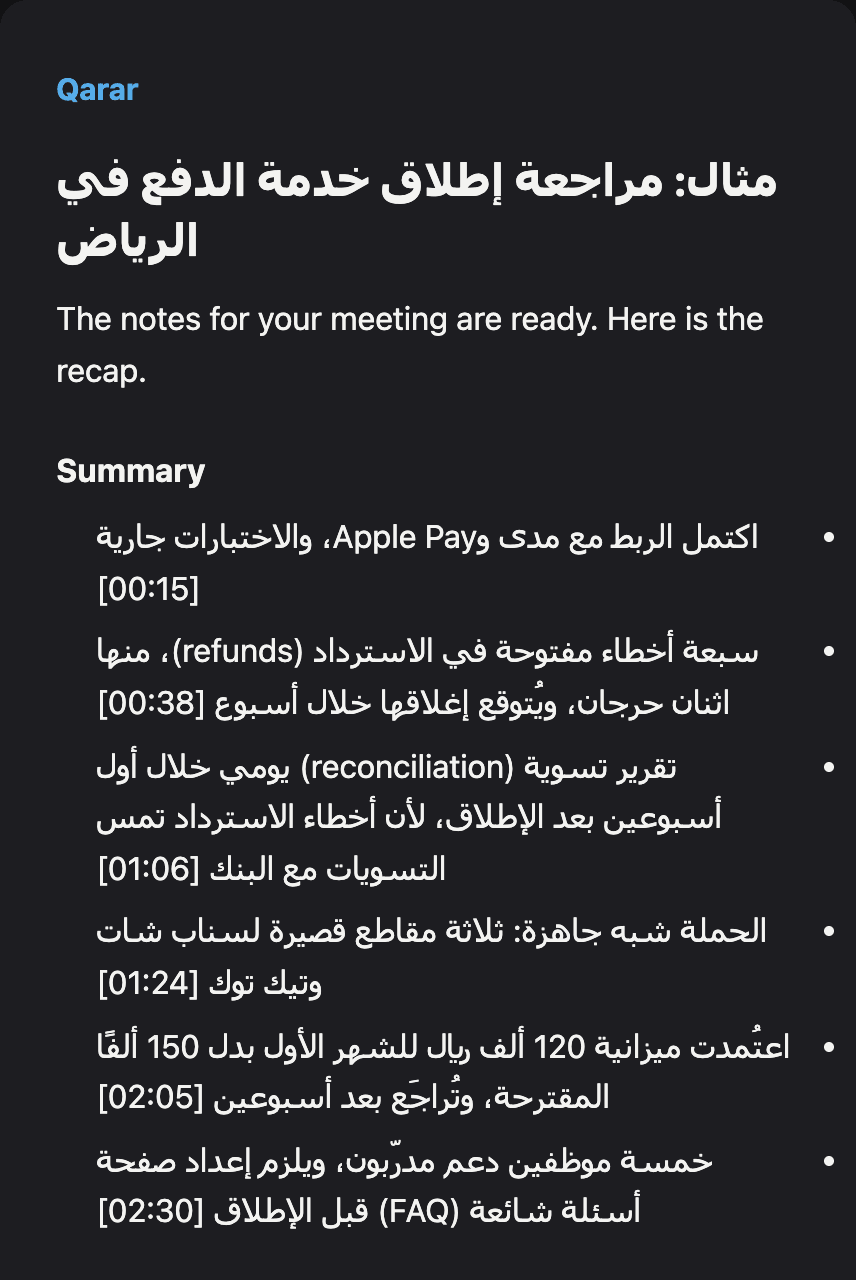
After reviewing the notes, share a recap by email or WhatsApp, or export the minutes as PDF or editable Word.
Illustrative follow-up prepared from a written example. No message is sent.
Download the minutes of a written example, without an account:
From your recording to notes you check yourself, in three steps. The free plan includes full notes for 4 meetings a month.
Your choice is kept after you sign in.
Upload it from Windows, a Mac or your phone, or export it from Zoom, Teams or Meet first. Qarar takes audio and video files such as M4A, MP3, WAV, MP4, MOV and WebM, or WhatsApp voice notes.
Up to 90 minutes a meeting on Free and 4 hours on paid plans, and up to 512 MB a file.
If your browser can’t record, Qarar says so and you can upload a file instead. No bot joins the meeting.
Record meeting audio and your microphone from the menu bar, then upload to Qarar for a transcript, summary, decisions, and tasks.
Start and stop recording from the menu bar. Meeting audio and your microphone, together.
Choose what to record. No bot joins your meeting.
Review it all in your account. Your meetings, transcripts and notes in one place.
Requires macOS 14.4 or later. Optional: uploading and recording in the browser work without it.
Open the ZIP and move Qarar to Applications. Sign in to get started. Recordings upload to Qarar for transcription and notes. Let participants know before recording. How we handle your recordings
Where it goes, who can use it, and when it is deleted.
What stays in dialect, who receives the recording, and how accurate it is.
Qarar is built for Egyptian, Levantine, Gulf and other dialects, and for meetings that mix Arabic with English. Accuracy depends on the recording, so check important names and numbers.
The summary, decisions and action items are in Modern Standard Arabic, quotes stay in the speaker’s dialect, and the full transcript stays verbatim. Select a note’s timestamp to hear the line it came from.
No bot joins the meeting. Upload a file from Zoom, Teams, Meet or your phone, or record in the browser: a call’s audio in Chrome or Edge on a computer, or the room with your microphone in Safari.
You confirm participants’ consent before each upload. Kalemio transcribes the audio, and the meeting text, without the audio, goes to an AI model through OpenRouter to write the notes. Neither Qarar nor Kalemio trains on your recordings, and you choose how long the audio is kept, from 7 to 365 days. What each provider receives
On 2.06 hours of single-speaker Levantine video, Qarar’s word error rate was 4.6% once dialect spellings are allowed. Those were the easiest two hours of our set, so don’t quote the figure without its limits. Gulf and Egyptian are being measured. Results and method
Paid plans from US$7.99 a seat a month, billed yearly.
Best for trying Qarar on a few of your own meetings each month.
US$0a month
Best for one person or a small team with regular meetings and a fixed monthly allowance.
US$12a seat a month, billed monthly
US$7.99a seat a month, billed yearly
US$95.88 per seat paid upfront for the year, before tax
Starter can’t be bought yet. Start free now; it will be in Billing once it opens.
Best for people who meet most days and want priority processing and saved views.
US$20a seat a month, billed monthly
US$12a seat a month, billed yearly
US$144 per seat paid upfront for the year, before tax
Pro can’t be bought yet. Start free now; it will be in Billing once it opens.
Best for teams whose guests correct shared meetings, with notes instructions for each meeting type.
US$29a seat a month, billed monthly
US$19a seat a month, billed yearly
US$228 per seat paid upfront for the year, before tax
Team can’t be bought yet. Start free now; it will be in Billing once it opens.
More than 4 meetings this month? Starter includes 1,200 minutes for US$12 per seat monthly, before applicable tax. Or pay US$95.88 upfront for a year, which is US$7.99 a month.
Choose Starter monthlyChoose Starter yearly
A plan renews each month or year until you cancel it in Billing. After you cancel, it stays until the end of the period you paid for; then the workspace moves to Free, and nothing in it is deleted.
Upload one recording on the free plan and compare the transcript and notes with what was actually said.